Feature · Breakdown and tasks
See the whole feature, part by part. Then hand off the tasks.
The planner drafts the work as parts in four lanes, each with best, likely and worst days. Your team edits it into the plan, and the parts become tasks with acceptance criteria.
In short
SprintProof’s feature breakdown drafts a plan as parts across four lanes: frontend, backend, data and cross-cutting work. Each part has a description, best, likely and worst days, a confidence and an owner. People edit, add, split and delete parts, then draft tasks with acceptance criteria and send them to Jira, Linear or CSV.
Facts you can check
- 4 lanesfrontend, backend, data and cross-cutting work
- 3 numbersper part: best, likely and worst daysHow estimates work
- 40 crto draft up to 20 parts from the interview
- 25 crto draft up to 60 tasks with acceptance criteriaPricing and credits
What you get
The work, written down before anyone starts.
Three estimates per part
Best, likely and worst days, so the estimate can show a range instead of one number.
Four lanes
Frontend, Backend, Data and Cross-cutting work, so a plan that is all screens and no migrations shows it.
Confidence and an owner
Each part says how sure the team is about it, low, medium or high, and who owns it.
Your edits are kept
Drafting again replaces only the planner’s own parts. Parts people added stay.
Ask about any part
Ask the planner a question about the plan or a part (2 cr). It can suggest a change, but never makes one.
Tasks your team can pick up
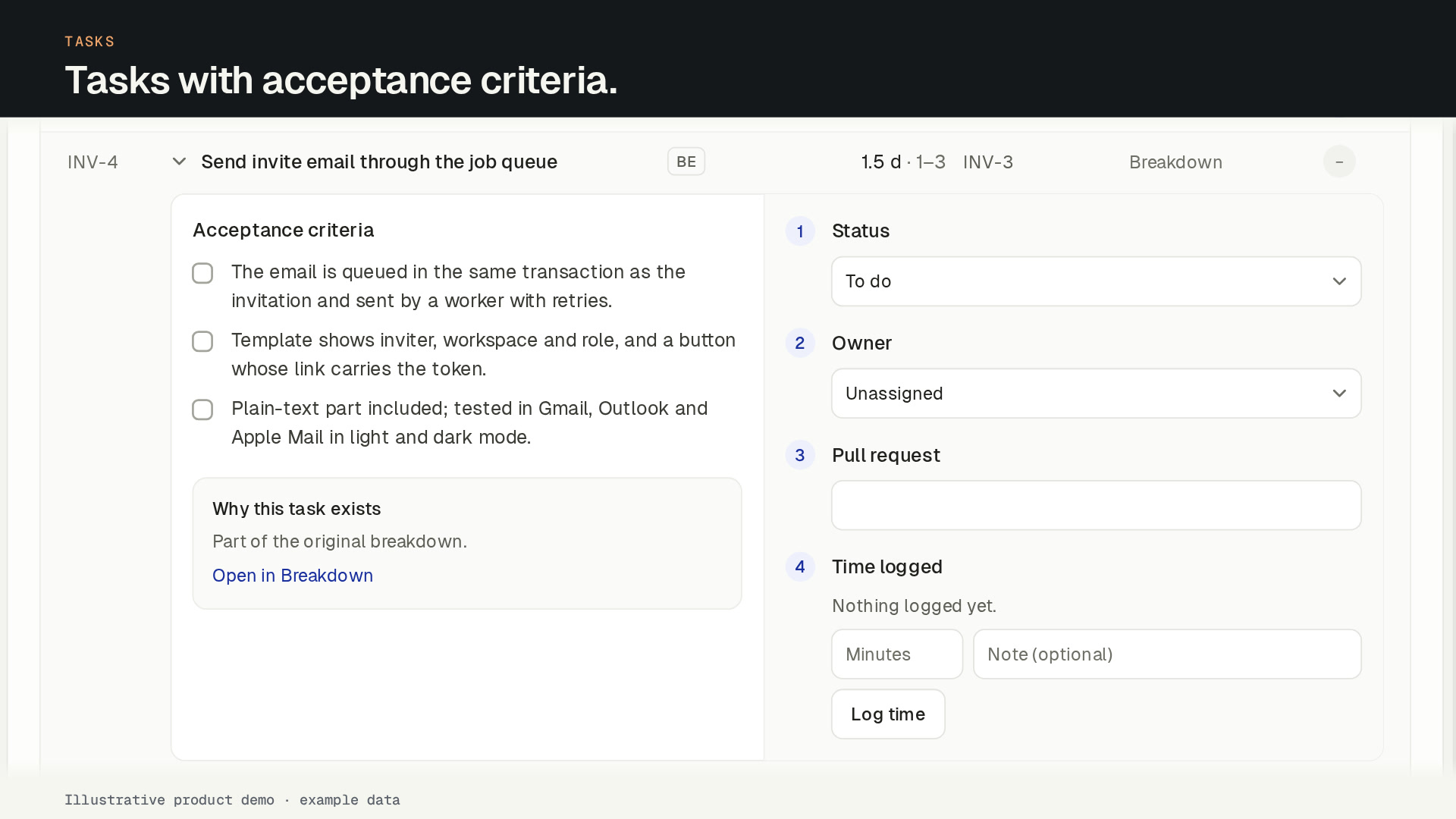
Task keys like INV-1, acceptance criteria a tester can check, dependencies and an “Order of work” strip.
How it works
From the interview to tasks, in five steps.
Every AI step shows its credit cost before you click, and nothing in the plan changes until someone accepts it.
- 01
Draft the plan.
40 crAt the end of the AI interview, click Draft now. The planner drafts up to 20 parts from the brief, “Done when” and “Out of scope”.
- 02
Read it lane by lane.
Parts are grouped into Frontend, Backend, Data and Cross-cutting, so missing layers stand out. Parts that came from the gap review are marked Added from review.
- 03
Make it yours.
Edit any part inline: title, lane, description, confidence, owner and the three estimates. Add parts the planner missed and delete the ones you don’t need. Editing is free.
- 04
Split what is too big.
5 crFor a part with a wide range, the planner proposes 2 to 5 smaller pieces. Applying them is one click, and free.
- 05
Draft the tasks.
25 crOnce the plan is agreed, the planner turns the parts into tasks with keys, acceptance criteria, dependencies and an order of work, ready for Jira, Linear or CSV.
What a part is
A part is a piece of the feature small enough to estimate but bigger than a task, for example “Invite email with expiring link” or “Seat limit check on accept”. The guide to breaking down a feature into stories and tasks shows the method by hand. Each part has:
- a title and a short description of what it covers;
- a lane: Frontend, Backend, Data or Cross-cutting;
- best, likely and worst days of work;
- a confidence of low, medium or high, and an owner;
- a comment thread, where the team discusses it before sign-off.
From parts to tasks
Draft tasks (25 cr) turns the parts into up to 60 tasks. Each task gets a key from the plan, such as INV-3, a type, acceptance criteria and the tasks it depends on. An “Order of work” strip shows what can start first, and each task has an owner, a status and the time logged on it.
Drafting tasks again replaces only AI tasks nobody touched. Tasks that were started, edited or sent stay. From the Tasks tab, send them to Jira or Linear, or download them as CSV. Sending never uses credits.
People decide
The AI suggests and people accept: nothing in the plan changes without a click. Editing parts and tasks, applying a split and applying a suggestion never use credits.
SprintProof breaks down one chosen feature. If you want to map a whole product journey into a story map first, see SprintProof compared with StoriesOnBoard.
FAQ
Feature breakdown: common questions
How does SprintProof break a feature down?
What happens to my edits if I draft again?
Can I split a part that is too big?
Who can edit the breakdown?
Where do the tasks go?
What does the breakdown cost?
Team
Plan the next feature before the sprint starts.
Create your account and name your workspace. Your first feature plan is free. To keep planning, subscribe to Team: the 14-day money-back guarantee applies.
Want to hear when the ChatGPT and Codex plugin ships? Leave your email.