Feature · Estimate
Not one number. A range and the dates behind it.
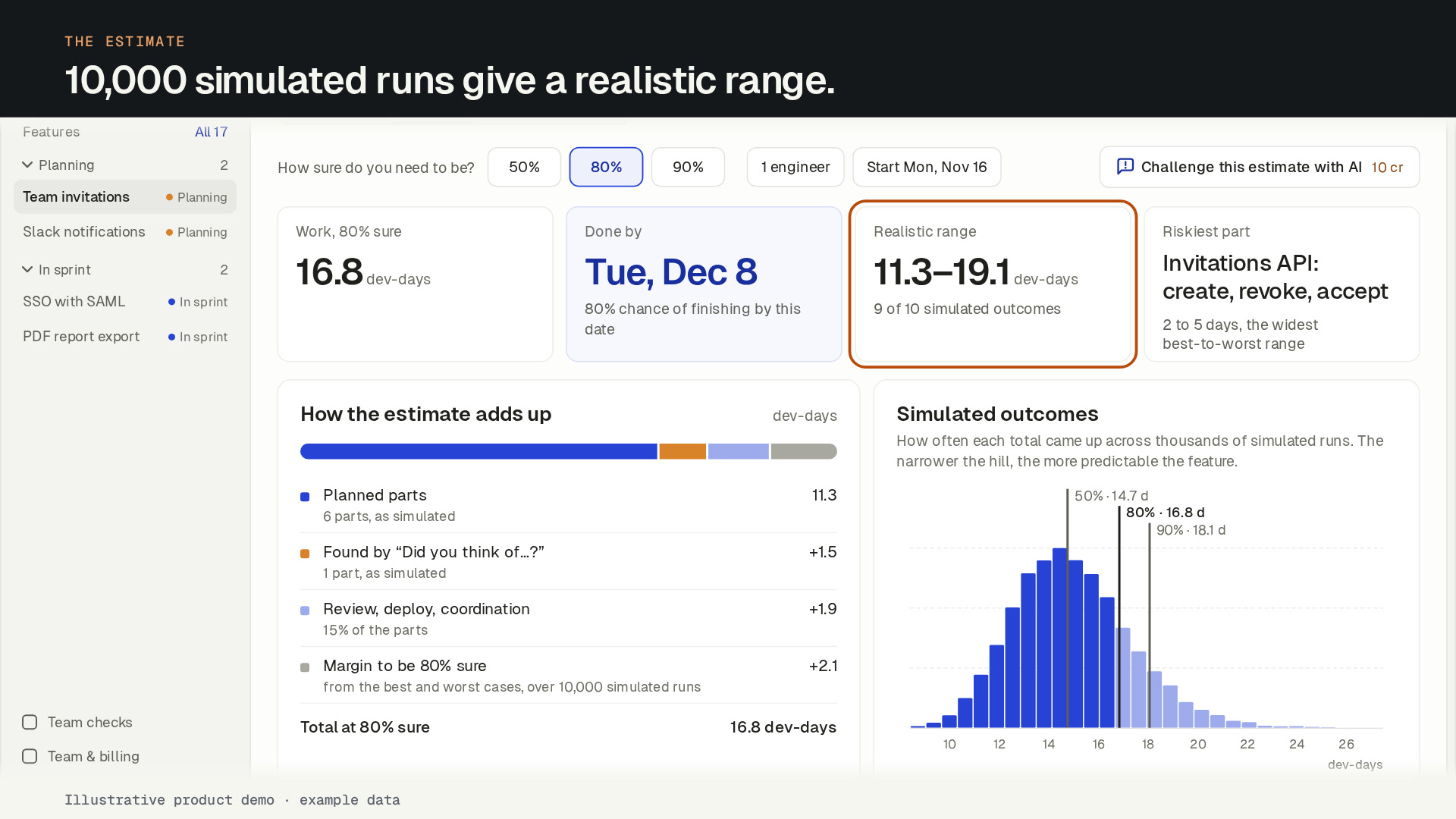
SprintProof runs the plan 10,000 times over every part’s best, likely and worst days, and gives you the dates you can be 50, 80 and 90% sure of.
In short
SprintProof estimates a feature as a range, never one number. It simulates the plan 10,000 times over every part’s best, likely and worst days and gives the dates you finish by with 50, 80 and 90% confidence. It shows how the total adds up and which parts are riskiest. The estimate is maths, not AI, and uses no credits.
Facts you can check
- 10,000simulated runs behind every estimate
- 50 · 80 · 90%dates for every plan, never one numberTry the free estimator
- 0 creditsfor the estimate, its dates and blind estimate rounds
- 10 crto have the AI challenge the estimatePricing and credits
What you get
Estimates with error bars.
50, 80 and 90% dates
Say “done by this date, with 80% confidence”, and show the 50% and 90% dates next to it. 50% for planning, 80% for a commitment, 90% for a launch date.
How the total adds up
Planned work, work found in the gap review, overhead and margin, each shown on its own line.
The riskiest parts
The parts with the widest ranges, which move the late dates most, so you know what to split or spike first.
Every outcome, charted
A chart of the simulated outcomes and a range bar for each part.
Blind estimates
Everyone votes privately, then the votes are revealed together with the spread, the median and the outlier. No credits.
A challenge on request
For 10 cr, the AI reviews the uncertainty and proposes fixes: add a spike, ask someone to decide, split a part.
How it works
Three numbers per part. Dates you can commit to.
Every AI step shows its credit cost before you click, and nothing in the plan changes until someone accepts it.
- 01
Give each part three estimates.
Every part in the breakdown has best, likely and worst days. The planner drafts them with the plan; your team corrects them.
- 02
Set the team and the start.
Enter the number of engineers and the start date. Dates count working days from there.
- 03
Pick how sure you need to be.
The estimate shows the range and the 50, 80 and 90% dates. Switch the confidence level to see the date you would commit to at each one.
- 04
Find the risk.
10 crThe riskiest parts are listed by how wide their range is. Split them, add a spike, or Challenge the estimate to get the AI’s proposals.
How the dates are worked out
Each part’s best, likely and worst days describe a spread of outcomes. The estimate draws a result for every part, adds them up, adds overhead (15% by default), and repeats that 10,000 times. Parts tend to overrun together, so each simulated run shares part of its overrun across the parts. The 50% date is the one half the runs finish by; the 90% date is the one nine in ten finish by.
Dates assume engineers work in parallel about 70% of the time, so a second engineer adds 0.7 of a person, not a whole one. No run finishes sooner than its longest part, and the work is counted forward in working days from the start date. The dates don’t model which part waits on which.
Estimate together, without anchoring
Start an estimate round on up to 20 parts with up to 12 people. Votes stay hidden until everyone has voted, then they are revealed at once, with the spread, the median and the outlier marked. The team talks about the outlier, not about whoever spoke first. Rounds never use credits.
Challenge the estimate
Ask the AI to challenge the estimate (10 cr). It says whether the plan looks realistic, optimistic or pessimistic, names the risks, and proposes actions: a spike, a decision someone has to make, a part to split, or missing parts and questions. You apply the findings you agree with, one click each.
The numbers come from the estimate engine, not from the AI.
What the estimate doesn’t claim
The estimate shows how uncertain the plan is; it doesn’t promise accuracy. It does not yet learn from how long past tasks really took. Time logged on tasks is recorded, but later estimates don’t use it.
FAQ
Estimates: common questions
Why does SprintProof show a range instead of one date?
How are the 50, 80 and 90% dates calculated?
Does the AI decide the estimate?
Does the estimate learn from past features?
What does the estimate cost?
Team
Plan the next feature before the sprint starts.
Create your account and name your workspace. Your first feature plan is free. To keep planning, subscribe to Team: the 14-day money-back guarantee applies.
Want to hear when the ChatGPT and Codex plugin ships? Leave your email.